I wrote about the specifics of charting brioche and Fisherman’s rib patterns in 2019, based on the functionality of Stitchmastery versions 3.0-3.1. If you’re using any of those versions, see that article: stitchmastery.com/charting-brioche-and-fishermans-rib-patterns-a-guest-post-by-kate-atherley.
This article is for those using version 3.2 or above, which introduced a new way of handling two-pass charts. See this article for an overview: stitchmastery.com/two-pass-charts-kate-atherley
As mentioned in the original article, brioche patterns can be challenging for a few reasons. There are different ways to make the same fabric – the brioche method has you slip stitches and make wraps around them with a yarnover/yarn-forward; the fisherman’s rib method has you work into stitches in the row below, instead. Each method offers its own variations, to create different effects, some of which can be worked in the other manner, some can’t.
For general information about brioche and fisherman’s rib symbols, and how to create charts single colour fabrics, see the article I wrote in 2019 on this topic, based on the functionality in Stitchmastery versions 3.0-3.1: stitchmastery.com/charting-brioche-and-fisherans-rib-patterns-a-guest-post-by-kate-atherley
But where things are different in this new version is two-colour brioche, both in terms of how the charts need to be made, and specifically how the charts are made in the newer versions of Stitchmastery.
Two-colour brioche is a two-pass method, requiring two balls of yarn. Using circular or double pointed needles, you work across the fabric with the first ball of yarn, working half the stitches while slipping the other half; then you slide back to the start of that row, and go across again, this time with the other ball of yarn, working the stitches that you’d just slipped, and slipping the ones that you’d just worked.
Then you turn around and do the same thing, on the other side; the order in which you use the two balls of yarn is always the same on both sides.
You can also work two-pass stitch patterns in the round. You’re still doing half the stitches with one yarn and half with the other; there’s just no turning around to the other side.
So how to chart these? The new two-pass features make this very easy!
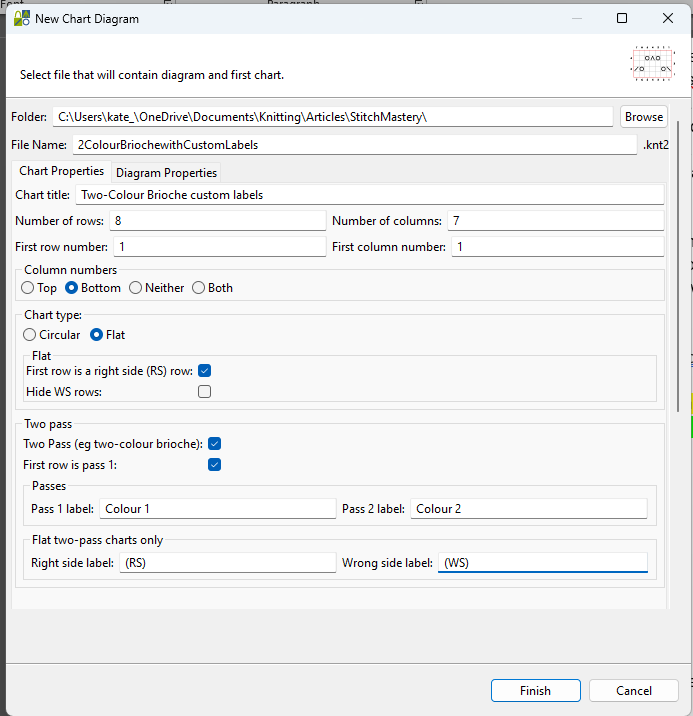
Make sure you check “Two pass” in the New Chart Diagram dialogue box. Then the other options become available to you.

By default, “First row is pass 1” is selected – that’s the most common option, used when the pattern begins with the first of the two yarns, and you’re starting the two-pass technique right away. There are some stitch patterns where you might need to specify a set-up row; selecting this other option allows you to have a starting row worked in the standard manner, with only one pass.
There are also default settings for Pass labels and Right-side and Wrong-side labels.
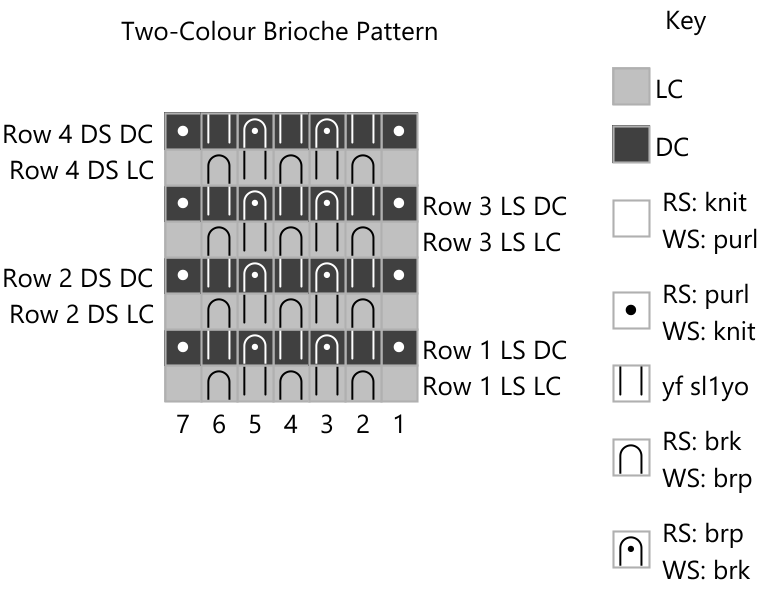
For Pass labels, the defaults are LC for “light colour” and DC for “dark colour”. Obviously, this might not be accurate for your project. Some designers use MC and CC for main and contrast colours; I often use Colour 1 and Colour 2. Change them to whatever makes sense!
Right-side and Wrong-side labels are only needed when working flat, of course. Brioche fabrics are generally reversible, looking just as good on both sides, so a right- or wrong-side designation isn’t always appropriate. Connected to LC and DC, Stitchmastery offers up LS for “light side” and DS for “dark side” as defaults. For the typical two-colour brioche fabric, the light-colour stitches are more visible on the right-side rows, and the dark-colour stitches are more visible on the wrong-side rows. If you’re not using the light colour/dark colour designations, then you’ll probably want to change these labels, too. I will often just use RS and WS, but “Side 1” and “Side 2” are also great, and using these reinforces the idea that both sides look good.
It’s also worth noting that the number of rows (up near the top of this dialogue box) might need attention. For a two-pass chart the number of rows option corresponds to the number of passes. That is, 8 “rows” for a two-pass chart will result in a chart with 8 lines, but only 4 distinct row numbers.
This is what you get if you use all the default options, and ask for a chart with 8 rows:
This is my usual set of selections
which results in this
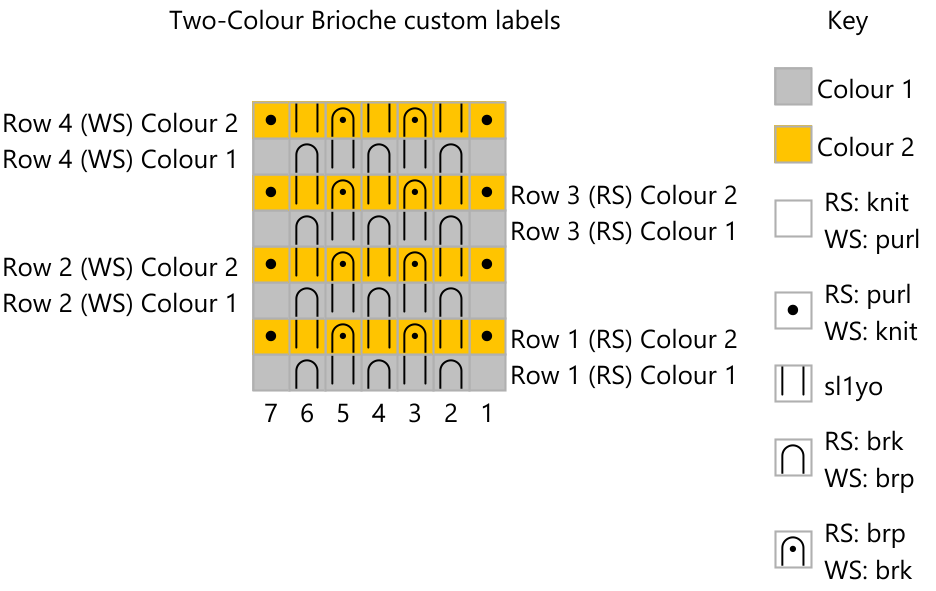
And remember, you can always modify the names of the stitches in the key. I’ve changed one name, for the slip-and-wrap stitch, to “sl1yo”, since that’s the term I use in my patterns.
If you are still using Stitchmastery versions 3.0.0 to 3.1.0, please refer to Kate’s previous article on brioche & fisherman’s rib which will help you with the settings.